Loading...
Infrastructure is code - and it should always be treated that way. With most infrastructure now running in the cloud, automating deployments while keeping them secure and reliable is no longer optional; it’s a necessity.
Talking about Azure, there are several ways to deploy resources:
- Azure PowerShell
- Azure CLI
- Azure Portal
- Azure REST APIs/SDKs
- ARM Templates, Bicep or Terraform
At their core, these methods all communicate with the Azure Resource Manager (ARM) layer, which orchestrates the deployment.
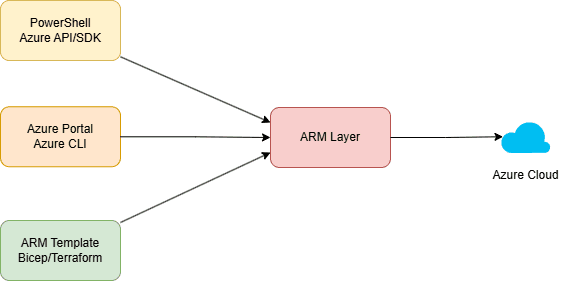
But with so many options, how do you choose the right one?
For production services, the fifth category - ARM Templates, Bicep, or Terraform - stands out. To understand why, let’s explore three key deployment requirements:
- Speed: Deployments must be fast - whether creating new resources or scaling existing ones (e.g., adding VMs to scale or availability when a region goes down).
- Security: Access to deploy or view resources in cloud must be tightly controlled, favoring non-human identities e.g. automation accounts over individual users.
- Safety: Deployments need visibility and safeguards, like region-based rollouts and health monitoring.
Requirement 1: Automated Deployments
Imagine a service with:
- 5 Virtual Machine (VMs)
- 5 Application Insight Instances
- 1 AI Instance
How does each deployment method handles this?
Category 1: Azure Portal
It’s all manual. For anything beyond a PoC, this is impractical.
Category 2: PowerShell, CLI, or APIs/SDKs
Here’s a basic process:
- Define variables (subscription, number of resources, etc.).
- Write scripts for API calls to create resources.
- Add logic for resource dependencies (e.g., deploy app insights after VMs, create AI keys, etc.)
- Configure the AI instance and inject keys in VMs.
Let’s try to understand the work required in each of the cases:
What if traffic increases and we want to increase number of VM?
If the code is modular, adjusting VM counts is straightforward but if we only want to scale only some VMs, the scripts need to be tweaked.
What if we want to add cost monitoring resource for our scaled-up VMs?
Another code tweak which we need to revert if we ever scale-down along with logic of having dependencies.
What if our service is now popular and we want to deploy to more regions securely and safely?
Add region-specific logic and deploy one by one with positive health checks.
This works because we have so much flexibility in writing custom code, but the complexity grows proportional as service scales.
Category 3: ARM Templates
Templates trades between flexibility and complexity. They are declarative and not procedural (like code scripts). You define what you want and forget about how.
A typical ARM template includes:
- Schema: API version of ARM layer.
- Content Version: For self-use, to maintain versions.
- Parameters: To not hard-code values in templates.
- Variables: Combines parameters and constants with logic for values.
- Resources: Specifies actual resources to be deployed.
- Outputs: Returns post-deploy output (e.g., resource details, metadata, etc.)
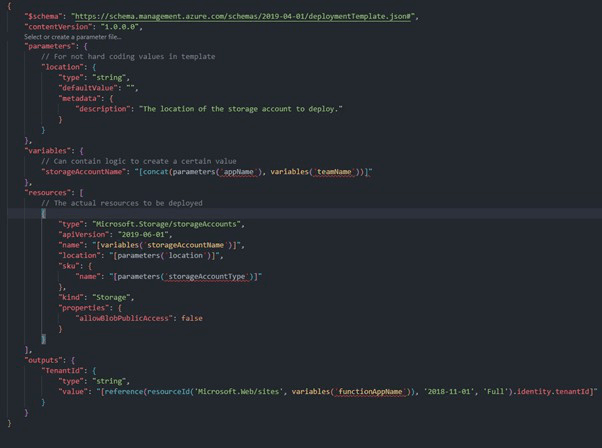
Don’t focus on syntax here since there are many tools to help generate it like:
- VS Code Extensions
- ARM Template Editor in Azure Portal
- GitHub Repository
Deployment is simple too – use any of the Azure CLI, Azure DevOps, Portal, or SDK tooling. Example:
Connect-AzAccount -ServicePrincipal -TenantId $TenantId -Credential $Credential
Set-AzContext [SubscriptionID/SubscriptionName]
New-AzResourceGroupDeployment  -ResourceGroupName <RG-Name> -TemplateFile <Template-File-Name> -TemplateParameterFile <Template-Parameter-File-Name>
Bicep is cleaner alternative to ARM JSON helping in maintainability while Terraform brings cross-cloud flexibility.
How does template help with our requirements?
- The biggest change is the template are idempotent:
- If re-deployed, resources end up in same state.
- If resource exists, template can choose to ignore it (faster deployment)
- If some setting is updated between 2 versions of template, the template deployment tries to update existing resource.
- The ordering and dependencies are already defined in templates, no custom logic is needed.
Requirement 2: Secure Deployment
Security starts with locking down access while maintaining a balance between usability. We need the following:
- An Identity to do deployment through templates.
- A group Identity of members of product team for post-deployment actions or monitoring.
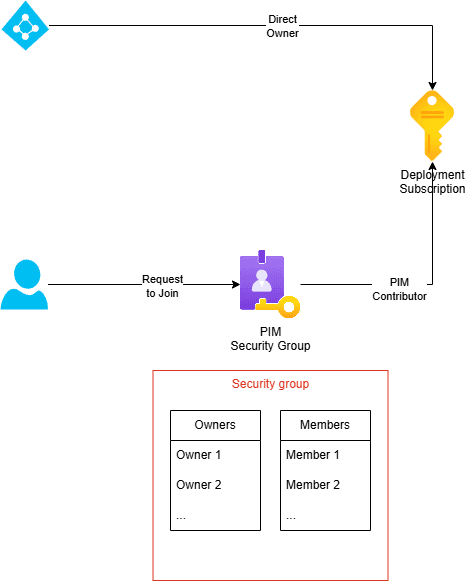
A very simple design to achieve this is have 2 role assignments:
- A service principal is granted direct “Owner” or similar access to deploy to azure subscription. DevOps can now be used to use service principal’s identity to deploy to Azure.
- An AAD security group is granted PIM “Contributor” or similar access to maintain azure resources once deployed.
- The users can join the security group post approval (from owners) and elevate to access resources.
Some additional points to consider:
- Use Federated credential for the service principal instead of secrets or certificates.
- Group membership should be scopes to resources instead of entire subscription.
- Regularly audit group ownership and membership to avoid lockouts.
Requirement 3: Safe Deployments
We have covered automation and security of an azure deployment. A last point to consider is the safety of the deployment. For a production service, safety means:
- Change should be deployed gradually – Internal Ring, Dog Food, Region 1, etc.
- Service Health should be monitored in each stage and deployment proceeds only with positive health.
- Recovery should be automated and validated.
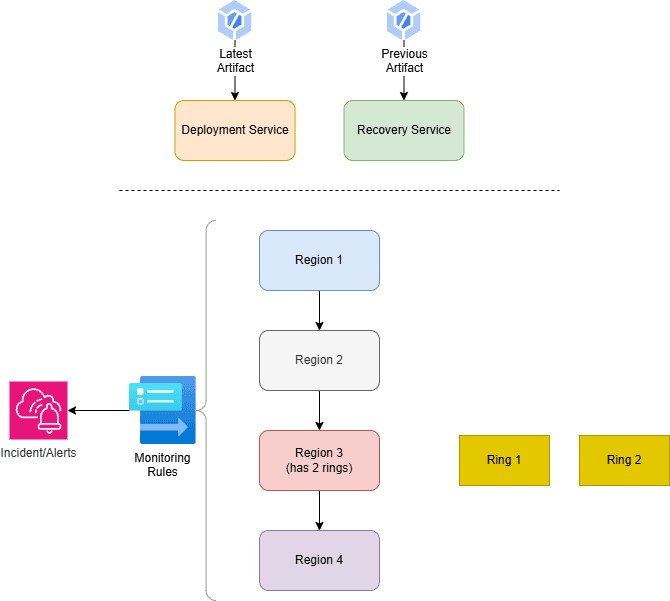
Templates enable fast, repeatable deployments, but safety requires orchestration. A high-level approach is:
- Split deployments by regions or customer rings and deploy stage incrementally.
- Define health rules or triggers to monitor service health at each stage. Alerting system should create appropriate incidents.
- A recovery service that maintains last known goods/artifacts is required as backup in case things go south.
Some key insights:
- Resources shouldn’t be tied to specific regions or rings (ring is a group of customers that may or may not include all regions).
- Deployments should be atomic - either fully succeeding or fully failing - and templates enable this.
Conclusion
Infrastructure as code with ARM templates, Bicep, or Terraform gives idempotency which helps in automated and fast deployments that scale effortlessly. Pair that with a locked-down identity model - service principals for deployment, PIM-managed groups for management—and you’ve got security covered. Add staged rollouts with health checks and automated recovery, and your deployments become safe, too.
DevSecOps next?