Loading...
Note: This blog was originally written in 2023. Some information may be outdated.
Authentication is a cornerstone of secure cloud services. Automation accounts, often referred to as non-human accounts, are granted permissions to access resources in production environments. While traditional authentication methods like passwords have been widely used, this blog explores modern, secure, and preferred authentication mechanisms for cloud-based applications. We’ll start with the fundamentals and progress to advanced authentication methods, providing a clear understanding of each approach.
Crypto 101
At its core, authentication is about enabling secure communication between two parties - let’s call them Alice (A) and Bob (B) - who have trust issues because they are geographically distant. For secure communication, Bob must ensure that:
- The message is intended only for Alice.
- The message originates only from Alice.
How can they achieve this? By SIGNING each message!! But how do you verify the signature unless you are buddies and know each other's handwritings? Answer is – They should know something unique about signature (e.g., a pattern, design, or key) that others do not or can replicate. In Cryptography, this can be achieved by encryption and there are 2 ways to encrypt a message:
- Symmetric Encryption: Uses a single shared secret key for both encryption and decryption. Examples include DES, AES, RC4, and RC5
- Asymmetric Encryption: Uses a pair of keys - a public key for encryption and a private key for decryption. Examples include RSA and ElGamal
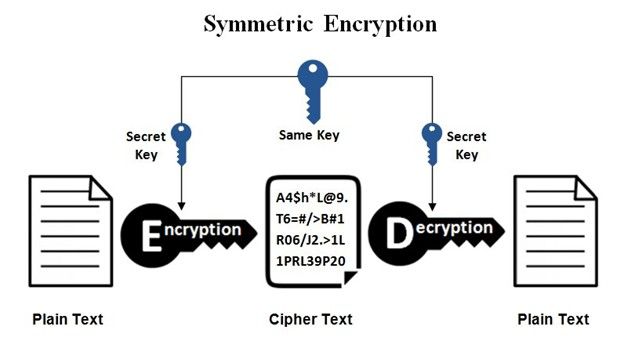
Mathematically, If A is the message and S is the secret key, encryption and decryption can be represented as:
A XOR S = B // EncryptionB XOR S = A // Decryption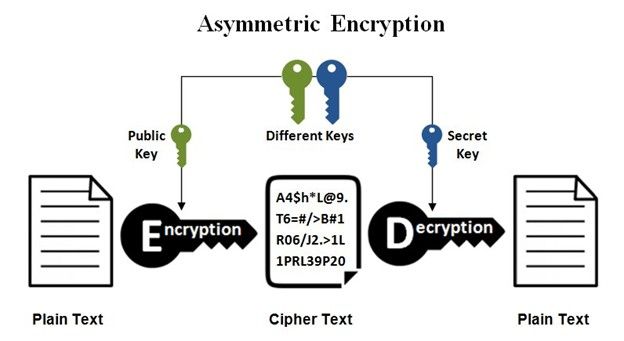
Mathematically, If A is the message, (n, e) is the public key, and d is the private key (where ‘e’ and ‘d’ are related):
B = A ^ e (mod n) // EncryptionA = B ^ d (mod n) // DecryptionAuthentication Methods (Requests from A)
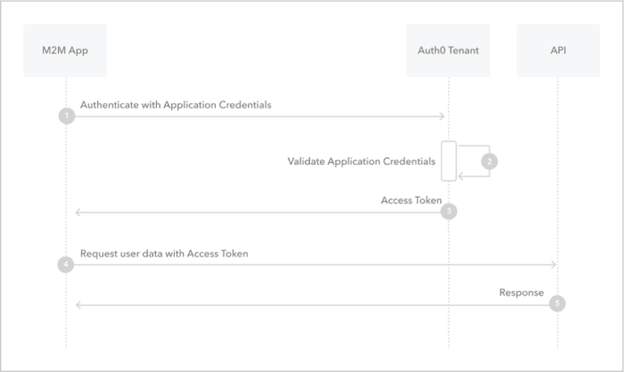
With a foundational understanding of encryption, let's explore three authentication methods commonly used in cloud services to authenticate applications (Alice) to a resource or API (Bob). Each method enables the application to obtain an access token (typically a JSON Web Token, or JWT) from a central authentication service by proving its identity. This token is then used to access the target cloud API.
1. Secrets (Shared Secrets)
In this method, the application sends a client secret (a shared secret key) directly to the authentication service to obtain an OAuth access token. For example, in Microsoft Azure AD, the request might look like this (using HTTPS for security):
# Replace {tenant} with your tenant!
curl --request POST \
--header "Content-Type: application/x-www-form-urlencoded" \
--data client_id=00001111-aaaa-2222-bbbb-3333cccc4444 \
--data scope=https://graph.microsoft.com/.default \
--data client_secret=A1bC2dE3f... \
--data grant_type=client_credentials \
--url 'https://login.microsoftonline.com/{tenant}/oauth2/v2.0/token'Note: Using secrets is straightforward but less secure than other methods, as the secret must be securely stored and transmitted to prevent compromise.
2. Certificates
Before understanding the underlying authentication mechanism, let’s understand certificates. It is nothing but a pair of public and private keys along with some metadata:
- Serial Number
- Subject
- Issuer
- Signature
- Signature Algorithm
- Expiry Date
- etc.
The application securely stores the private key and shares the public key with the authentication service (e.g., Auth0 or Azure AD). To authenticate, the application generates a signed JWT using its private key, which includes claims such as:
- iss (issuer): The client ID.
- sub (subject): The client ID.
- aud (audience): The token endpoint URL.
- exp and iat: Expiry and issuance timestamps.
The authentication service verifies the JWT using the public key and, if valid, issues an OAuth access token. The request looks like this:
curl --request POST \
--header "Content-Type: application/x-www-form-urlencoded" \
--data client_id=00001111-aaaa-2222-bbbb-3333cccc4444 \
--data scope=https://graph.microsoft.com/.default \
--data client_assertion=<signed_jwt> \
--data client_assertion_type=urn:ietf:params:oauth:client-assertion-type:jwt-bearer \
--data grant_type=client_credentials \
--url 'https://login.microsoftonline.com/{tenant}/oauth2/v2.0/token'Note: Certificates are more secure than shared secrets because the private key never leaves the application, reducing the risk of exposure.
3. Federated Credential
Federated credentials build on the certificate model but use an external identity provider to issue a JWT. The application presents this JWT to the OAuth token provider, which must trust the external identity provider to validate the token and issue the final OAuth access token.
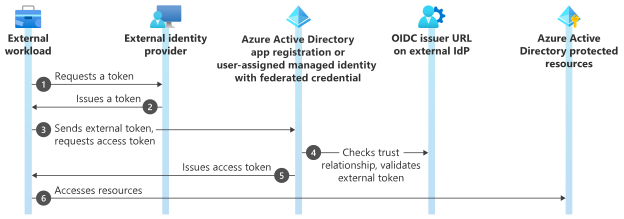
Note: This method is quite secure and particularly useful in scenarios where applications operate across different trust domains, as it eliminates the need to manage certificates directly within the application.
Message Reply (Response from B)
Upon successful authentication via any of the above methods, the authentication service responds with a JSON object containing the access token, typically in this format:
{
    "token_type": "Bearer",
    "expires_in": 3599,
    "access_token": "eyJ0eXAiOiJKV1QiLCJhbGciOiJSUzI1NiIsIng1dCI6Ik1uQ19WWmNBVGZNNXBP..."
}
The application (Alice) includes this access token in requests to the API (Bob), which verifies the token to authorize access. Authorization is often performed using an Access Control List (ACL):
- The API decodes the token to extract claims like appid (application ID) and iss (issuer).
- It compares these claims against its ACL, which may be a static list or a dynamic web service, depending on the cloud platform.
Resources
For further reading, explore these resources:
- Client Credential: OAuth 2.0 client credentials flow on the Microsoft identity platform - Microsoft identity platform | Microsoft Learn
- Federated Identity Credential: Workload Identity Federation - Microsoft Entra Workload ID | Microsoft Learn
- Certificates: Public key certificate - Wikipedia